
Water Eject from Speaker
Remove water from your speaker.
Other Tools






Water Eject from Speaker: What You Need to Know for Better Speaker Condition
Has your cell phone, tablet, or laptop speaker gotten wet? This can cause the speaker’s sound to become muffled, completely distorted, or significantly reduced. It’s crucial to remove water from the speaker quickly and completely. Leaving water inside will increase the risk of speaker damage over time.
For a quick and effective solution, you can use our free fix my speaker tool. Using our tool is very easy. First, maximize your device’s volume. This process is essential for better water removal. Make sure your device’s vibration mode is also enabled. After completing these steps, tap the button in our tool and wait until the sound has completely played and finished. You can easily monitor the sound playback status by viewing the progress bar.
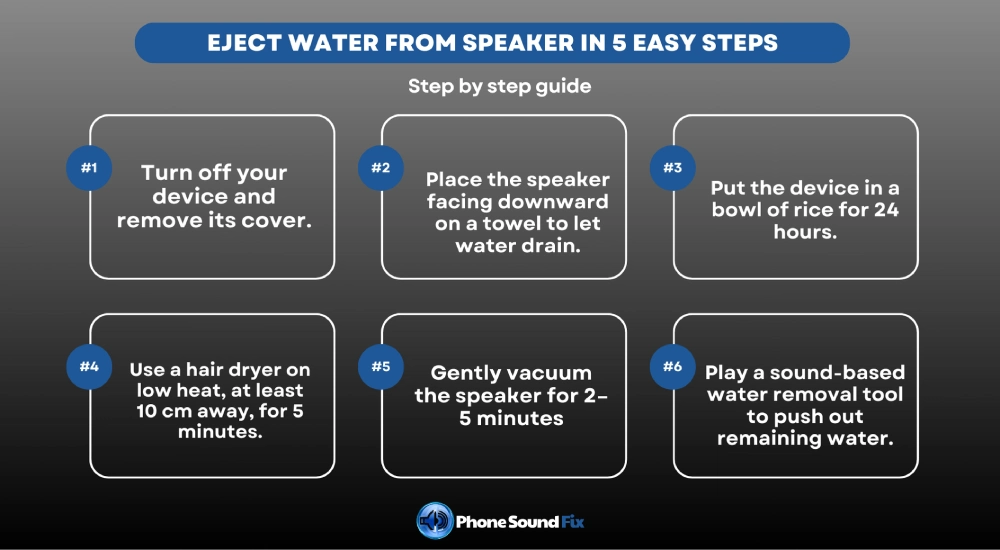
Eject Water from Speaker in 5 Easy Steps
- Use a Drying Cloth & Gravity
To restore your soaked speaker, first prepare a drying towel. Turn off the device and remove any cover. Adjust the speaker side of the device so that it faces downward to utilize gravity. Gently tap the device and shake it up and down gently to allow the water to drain. Once the water has drained, place the device on a towel on a flat surface and wrap the speaker side with the towel to absorb the water.
- Using Rice
While not always, devices placed in rice can sometimes be removed from the water. Add enough rice to a glass bowl. Then, immerse your device so that the speaker is in contact with the rice. Let the speaker remain in the rice for about 24 hours.
- Air Dry
Add the speaker side of your device to the speaker side. Then, set the air dryer on a low heat setting. Apply the hair dryer for 5 minutes, without placing it too close to the speaker. The distance between the speaker and the hair dryer should be no more than 10 cm. Too close a vacuum can cause water to travel through the speaker and melt plastic parts.
- Applying a light vacuum
You can use a small vacuum cleaner or hand pump to suck up water from the speaker grille. However, be very careful when doing this, as excessive vacuuming can damage the speaker’s diaphragm. This process can take 2-5 minutes until the water particles are expelled. Wipe away any water from the speaker with a dry cloth.
- Use sound-based water removal tools
You can easily remove water from the speaker in minutes using our specially developed Eject Water from Speaker tool, which is designed to remove liquid buildup from the speaker.
Problems That May Occur When a Speaker Gets Water
Various problems could occur in the Speakers when they get wet. Your speaker’s sound may disappear completely, or the sound quality may deteriorate. In this section, we’ve explained some of the problems that can occur when a speaker gets wet:
• Sound Quality May Deteriorate: If water gets into the speaker, the sound level may decrease, the sound may become muffled, or the sound may not be clearly audible. This means the diaphragm in the speaker is not performing its function properly due to the water.
• Chemical & Physical Reactions: Water entering the speaker can cause chemical reactions such as corrosion, rust, and oxidation as it sits on mechanical components over time. In this case, the speaker may fail completely or the sound quality may decrease.
• Short Circuits May Occur: Water is a superconductor. When it comes into contact with electronic circuits, it can cause a short circuit. For devices that do short circuits, technical service support is necessary.
• Damage to Adhesives: Some speaker components are assembled with adhesives. Adhesives with low water resistance lose their properties and can cause some components in the speaker to become dislodged. In this case, the speaker may not function properly.
Precautions to Take Against Water Accumulation on Speakers
Whether it’s a mobile phone or a laptop, the speakers of any device should be protected against water and other liquids. Regular cleaning and protection will ensure trouble-free use of your device for many years. Effective measures you can take to protect your device from water:
• Always keep your device clean. Thoroughly wipe it down with a clean microfiber cloth weekly. This will also help preserve the device’s aesthetic appearance.
• Keep it away from moisture and wet environments. Be especially careful to store your device in a dry and clean environment, such as bathrooms, sinks, poolside areas, and seaside areas. The high levels of salt and chlorine in the pool and seawater can seriously damage the device. Furthermore, in areas with high evaporation, such as bathrooms, water can penetrate the device more easily. Therefore, you should also protect your device from steam.
• Test the speaker’s health and check for any water-related issues mentioned above. If you experience any of the problems mentioned above, clean your device.
Frequently Asked Questions About Water Eject Speaker
The Eject Water from Speakers tool is software that uses special sound and vibration waves to remove water and moisture accumulated in your speakers.
No, the tool generates special vibrations at a frequency that will not harm the speaker.
For minor moisture, a few minutes will be sufficient to remove the water. In cases of heavy exposure to water and moisture, several applications may be necessary.
If the water doesn’t completely remove, turn off the device and apply natural drying, rice/silica gel, or professional drying methods.