
Getting water inside your AirPods is a very annoying situation. But don’t worry, in this article, we’ve prepared a comprehensive guide on how to remove water from your AirPods. By reading our article, you can quickly and easily clean your AirPods. You can also use our Fix My Speaker tool for effective dust and water removal. Instructions on how to use our tool:
First, access the Water Eject AirPods tool page on our website. Connect your AirPods to your phone or computer. After connecting, turn the volume up to maximum. You’re ready to go. Then, tap the button on our tool to start the audio file and wait until it finishes. You can monitor the progress bar for the audio to stop completely.
After completing this process, test your AirPods with different types and volumes of sound. If the problem persists, you can repeat the process a few more times.
Why is Water Eject Important for AirPods?
When AirPods are exposed to water, it’s important to intervene quickly to prevent permanent damage. We’ve listed the potential water-related damage to your AirPods below:
- Decreased Sound Quality: Water entering your AirPods can significantly reduce sound quality. This will negatively impact your phone calls and music listening experience.
- Moisture-Related Mechanical Failure: When your device is exposed to moisture, the conductive wires and circuits inside can short-circuit and suffer permanent damage.
- Device Lifespan: If you don’t water-eject your AirPods immediately, even if the device isn’t damaged immediately, it can deteriorate over time due to corrosion caused by water.
- Touch Control Failure: Your AirPods’ touch control button may become inoperable.
- Battery Lifespan: If water comes into contact with the battery compartment of your device, the battery will be negatively affected, and its capacity may decrease.
- Microphone Failure: Exposing the microphone to water can reduce sound quality or even cause it to malfunction completely.
Features That Set the Water Eject AirPods Tool Apart from Other Tools
| Features | PhoneSoundFix.com’s Water Eject AirPods Tool | Other Tools |
| Ease of Use | It has a very user-friendly interface. | You may need to download an app or sign up to use the tool. |
| Success Rate | Based on feedback from our users, it has a 95% success rate. | Success rates vary. Some tools may not be effective for cleaning. |
| Pricing | It’s 100% free. | You may be asked to watch an ad or pay a fee. |
| Compatibility | It has been developed to be fully compatible with all devices. | It is not compatible with every device. |
| Reliability | It is 100% safe. It will not cause any harm to your device. | It may not be safe. |
Some Reasons to Use the Water Eject Tool for AirPods
The Water Eject Tool was specifically developed to achieve full success with these devices. The tool’s special sound and vibration frequencies not only remove accumulated water from your device but also clean it of dust, dirt, and other debris.
The audio files used in our tool are designed to cause no harm to your device. While some other tools can overload the speaker diaphragm and cause vibrations, our tool focuses on cleaning your AirPods’ speakers.
Using our tool is very easy. You don’t need to register, pay any fees, or download a mobile app. This tool, developed to provide our valued users with the best experience, is easy to access with a single click and can be used for as long as you like, free of charge.
Do-It-Yourself Steps for Water Eject AirPods
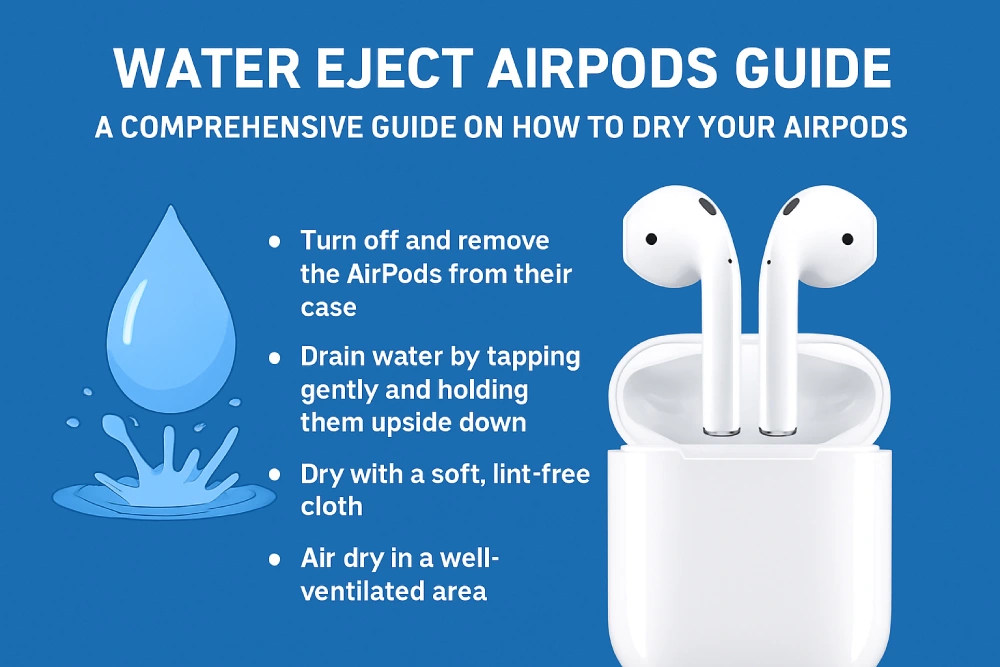
If your device is partially malfunctioning, hasn’t been exposed to excessive water or moisture, and is still working, you can restore it using a few methods. Here are the steps to remove water from your device:
- You can prepare a dry cloth, Q-tip, or cotton ball to remove the water from your device.
- First, thoroughly wipe the water off the exterior of your device using a dry cloth.
- After drying the exterior, remove the earbud silicones and dry the interior with a Q-tip.
- After removing the earbud silicones, thoroughly wipe the speaker grilles with a Q-tip. Then, place the earbuds on the cotton ball, with the sound outlet facing downward, and allow the accumulated liquid to absorb. You can repeat this process for about 10 minutes.
- Finally, use the Water Eject AirPods tool and then test the sound on your device.